
Highlight and focus code lines
Set inclusive line ranges, independent background colors and opacity for emphasis and focus without editing code comments.
Screenshots show the English interface; controls are available in your selected website language.
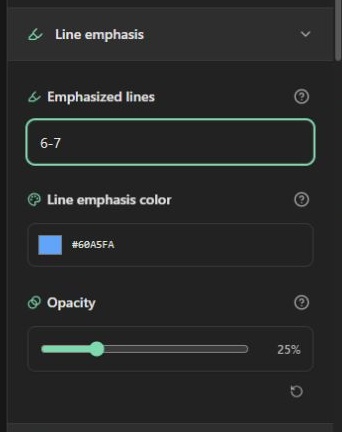
Emphasize selected lines
Enter 3, 5-8 under Emphasized lines to select source line 3 and lines 5 through 8. Ranges are one-based and inclusive; blank lines count. Commas separate ranges, and 8-5 is normalized to 5-8. These are source positions, independent of the displayed starting line number. Clear the field to remove the effect. Invalid input shows an error and clears that effect's active ranges until the input is valid.
Choose a color and opacity. The default emphasis is blue #60a5fa at 25%. Opacity controls the background overlay, not the text: 0% makes the background transparent and 100% makes it solid. The reset icon restores the default color and opacity without clearing selected lines.
Focus the reader's attention
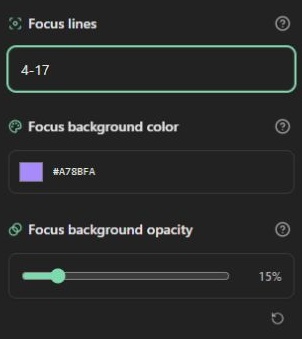
Expand Lines and markers and enter a Focus lines range. Focused lines keep normal text rendering and receive their configured background. Other source lines render at 45% text opacity with a 1 px blur. The focus opacity slider controls the focused background, not the dimming of other lines. Focus defaults to blue #60a5fa at 25%; the demonstration deliberately uses purple at 15% to make effects easier to distinguish.
An empty focus range leaves all lines sharp. A range entirely beyond the source does not dim the whole document. Focused content is still present in HTML: blur and dimming are presentation, not redaction.
Combining effects
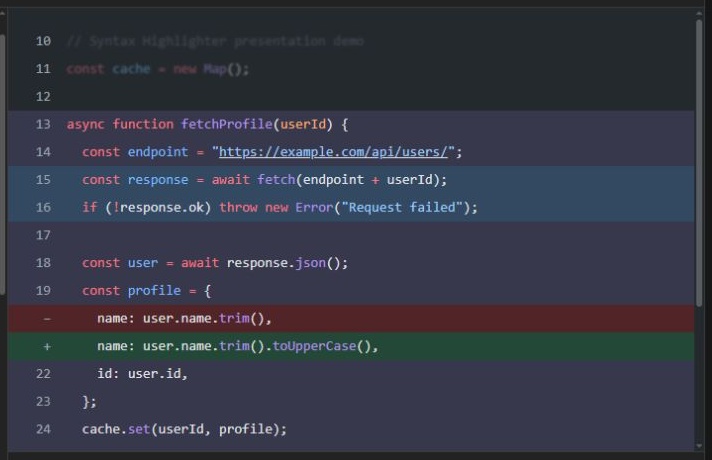
When a line belongs to several background groups, precedence is deletion, addition, emphasis, then focus. Focus text treatment can still apply independently. Use diff settings for before/after examples. All ranges and colors appear in config.json and feed the same preview and output model. Comment directives are not parsed; use the controls instead.
Open the code highlighter · All guides · Articles and comparisons