
Code diff highlighting: added and removed lines
Mark additions and deletions with separate colors, opacity and indicators for readable before-and-after code examples.
Screenshots show the English interface; controls are available in your selected website language.
Mark changes explicitly
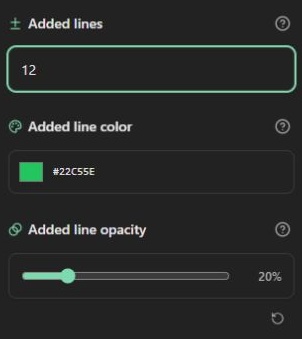
Open Lines and markers. Enter Added lines and Removed lines using source positions such as 7 or 11-12. Each group has its own range, color and opacity controls. This is a presentation tool: it does not compare two files or calculate a Git diff. Both old and new lines must already be in your source, and you choose which to mark.
The default addition background is bright green #22c55e at 20%. Lower opacity leaves more of the theme background visible. The reset icon restores that group's color and opacity, keeping its range.
Configure deletions independently
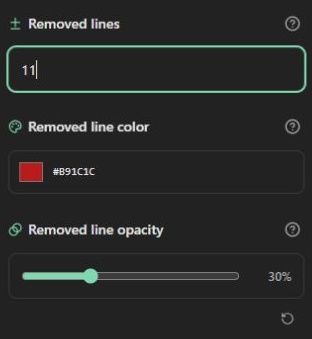
Deletion defaults to dark red #b91c1c at 30%. Deleted lines remain visible in both preview and export; the setting does not remove source. When a line is marked as both added and removed, deletion takes precedence. An invalid range clears only the corresponding active range and shows a validation message.
Keep a cue beyond color
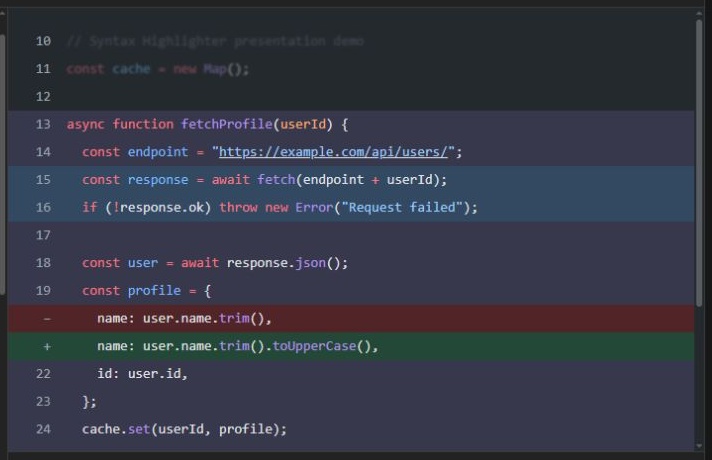
Enable Diff indicators to show + and −. With line numbers enabled, the gutter option can replace the number on a changed row with its indicator. With that option off, indicators have their own column. If line numbers are hidden, indicators can still appear. Turning indicators off preserves colored backgrounds.
The demo marks source line 11 as removed and line 12 as added. Its displayed numbering starts at 10, so use source positions rather than displayed labels when reproducing it. See line numbering. Inspect changes under both light and dark themes; avoid relying on red and green alone to explain a change. The same settings are serialized for all three HTML output strategies.
Open the code highlighter · All guides · Articles and comparisons