
Code block line numbers and starting offsets
Show line numbers, change their starting value and color, and position diff indicators without changing source ranges.
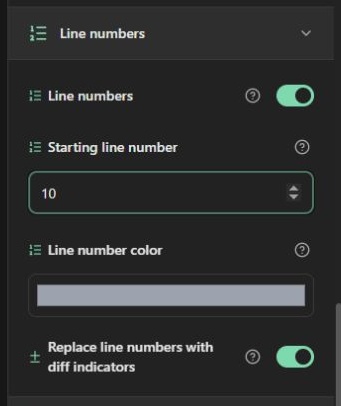
Screenshots show the English interface; controls are available in your selected website language.
Show and style numbers
Expand Line numbers and enable the switch. Numbering is initially off; the default starting number is 1 and the number color is #888888. When numbering is enabled, the starting-number field and color picker appear. Valid starting values are integers from 0 through 999999.
A starting value of 20 labels the first source line 20, the second 21, and so on. It is useful when presenting an excerpt from a longer file. Blank and folded lines still occupy positions: numbering does not restart inside a collapsed section. Gutter width adapts to the length of the displayed numbers.
Source positions stay unchanged
If you change the starting number to 20 and want to emphasize the first source line, enter 1, not 20, in Emphasized lines. The same rule applies to focus, added, removed and collapsed ranges. Numbering changes labels only; it neither adds source lines nor rewrites your code.
Position change indicators
Enable Diff indicators in Lines and markers. The line-number group's replacement option puts + or − in the number column for changed lines. With replacement disabled, the number and indicator occupy separate columns. With indicators disabled, normal numbers remain. With line numbers disabled, visible indicators use their own column.
Numbers and indicators are excluded from text selection where the browser supports the generated selection rules. They are presentation aids, not part of your source string. Check a folded block and a diff example before exporting an excerpt with a large starting number.
Open the code highlighter · All guides · Articles and comparisons