
Syntax highlighting JSON configuration reference
Inspect every generated configuration field, default value and range rule used by the preview and output serializers.
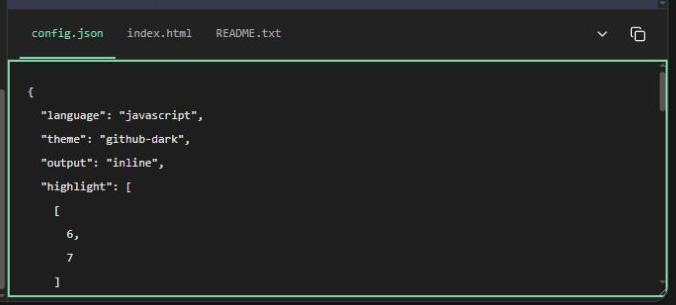
Screenshots show the English interface; controls are available in your selected website language.
One configuration, three serializers
Every presentation control updates config.json. The preview and inline/CSS/Tailwind outputs consume this same configuration. The file tab is read-only: it is not a JSON editor or an import facility. Copy the file or keep it in the downloaded ZIP as a record of your settings. It does not contain the source code, so save that separately.
Load demo replaces source and settings with a complete presentation example, while keeping the selected output format. It also resets draft range inputs and the preview panel state. It is useful for discovering controls, but not an undo or restore operation.
Fields and defaults
| Field | Default | Meaning |
|---|---|---|
language | javascript | Canonical bundled language ID |
theme | github-dark | Bundled theme ID |
output | inline | inline, css or tailwind |
highlight, focus, add, remove, collapse | [] | Inclusive source ranges, e.g. [[3,5],[8,8]] |
highlightColor, focusColor | #60a5fa | Independent blue backgrounds |
highlightOpacity, focusOpacity | 25 | Background opacity, 0–100 |
addColor, addOpacity | #22c55e, 20 | Addition background |
removeColor, removeOpacity | #b91c1c, 30 | Deletion background |
lineNumbers | false | Show the number gutter |
lineNumbersStart | 1 | Display offset, integer 0–999999 |
lineNumberColor | #888888 | Number gutter color |
diffIndicators | true | Show plus/minus markers |
diffInGutter | false | Replace changed line numbers with markers |
autolink | false | Make supported URLs clickable |
summary | … | Fold summary suffix, up to 80 characters |
Range and output semantics
Ranges use one-based source positions and include both endpoints. Source position and displayed line number are different concepts. An empty range disables its effect. The UI normalizes reversed endpoints; invalid text produces a visible validation error rather than silently selecting an unrelated line.
There is no comment-directive parser. Text such as [tl! focus] stays ordinary source text. Configure effects through controls, then inspect the JSON rather than modifying code comments. The schema describes the current application, not a published remote highlighting API.
Use HTML export to obtain styled output. To reproduce a configuration manually in another session, reopen the tool, restore your source and apply the saved settings through the controls. Automatic JSON import and session restoration are not implemented.
Open the code highlighter · All guides · Articles and comparisons